
Quality management on SAP BTP
Audit management software
that does not stop at the root cause
Finding, root cause analysis, action and effectiveness check connect inside one system — instead of four tools with a spreadsheet in between.
-
End to end
Finding to effectiveness, one data model
-
SAP-native
Your BTP, your roles, your identity provider
-
To the standard
ISO 19011 · 5-Why · 8D to VDA structure
-
Separated
Its own data area per tenant
Overview
The portal in four minutes
One finding, followed all the way through: from the audit point to the root cause, the actions and the effectiveness check — and back again.
Right now I am looking for two or three pilot users who want to try this against their own processes. If that could be you, the contact form is further down the page.
Read transcript
The finding sits in the audit report. The root cause analysis lives in an Excel file. And whether the action actually worked — by the next audit, nobody knows. That's the gap this is about. And in about three minutes I'll show you how that gap can be closed. Hi, my name is Andreas Bauer. I've prepared audits, supported them, and I've been on the audited side myself. And I keep seeing the same pattern. It isn't the method that's missing. 5-Why, 8D and CAPA are in every QM manual. What's missing is the connection between them. Four tools, an Excel list in the middle — and the evidence of the chain only appears once the auditor asks for it. qportal starts exactly there. One data model for all four steps. I'll use a case everyone knows. Internal audit, goods receipt. A measuring instrument in use whose calibration has expired. The finding is recorded right at the audit point. With category, severity and the audit criterion it was assessed against. Here it's a major nonconformity. Inspection decisions were made with an instrument that was not under control. The evidence sits on the same record. Label, calibration certificate, inspection reports. And the audit context too. Which audit it came from, for which organizational unit. So the finding doesn't end in a report. It's an object you keep working with. From the finding I open the root cause analysis. And you see two separate chains. Why the failure occurred. And why the failure wasn't detected. That's the distinction where analyses so often fail in practice. The occurrence chain ends at a manually maintained list with no due-date check at all. And the detection chain ends where nobody ever updated the goods receipt checklist — because there's no process for it. The causes turn into actions. And within the same analysis. Immediate action, corrective action, prevention. Each with an owner and a due date. What matters is the link. It's documented which action addresses which cause. Not in the head of the person who was at the audit, but traceable for everyone in the system. And then the step that's missing most often in practice. This analysis is set to "in progress". Five of seven steps. It can't be set to "done" while the prevention step is still open. And now the point that matters in an audit. From the action I go back into the analysis, and from there to the finding that triggered it. The chain is provable backwards. That was the audit module. Audit is the start. Root cause analysis and actions are separate modules in the same portal. With shared master data and users. qportal runs on SAP BTP. Then the users and roles stay yours. Or qportal can be hosted as SaaS. If you'd like to see how qportal looks in your own processes, the contact link is right below this video. Write to me — tell me where your chain breaks. Then we'll look together at how the process could work in qportal.
The starting point
The method is not missing — the connection is
5-Why, 8D and CAPA are in every quality manual. What regularly gets lost is what sits between them.
-
The finding ends in the report
The audit report is distributed and the analysis then starts in a new file — with no link back to the deviation that triggered it.
-
Cause and action live apart
The root cause analysis sits in a form, the action in a list. Which action addresses which cause is known only to the people who were in the room.
-
Effectiveness is asserted, not evidenced
The action is set to done. Whether it worked is written down nowhere — until the same finding comes back in the next audit.
-
The audit trail of the chain is missing
The evidence exists but is spread across folders, mailboxes and spreadsheets. Collecting it takes longer than the audit itself.
The connected flow
From the finding to the evidence of effectiveness
Four steps, one data model. Every step knows its predecessor, which is what makes the chain provable backwards in an audit.
-
1 Step 1
Record the finding
Deviation with classification, standard reference and evidence right at the audit question — not in a follow-up report.
Learn more → -
2 Step 2
Analyse the cause
Start 5-Why or 8D from the finding. Occurrence and detection chains stay separate.
Learn more → -
3 Step 3
Drive the action
Containment, corrective and preventive actions with an owner and a due date — portal-wide in one place.
Learn more →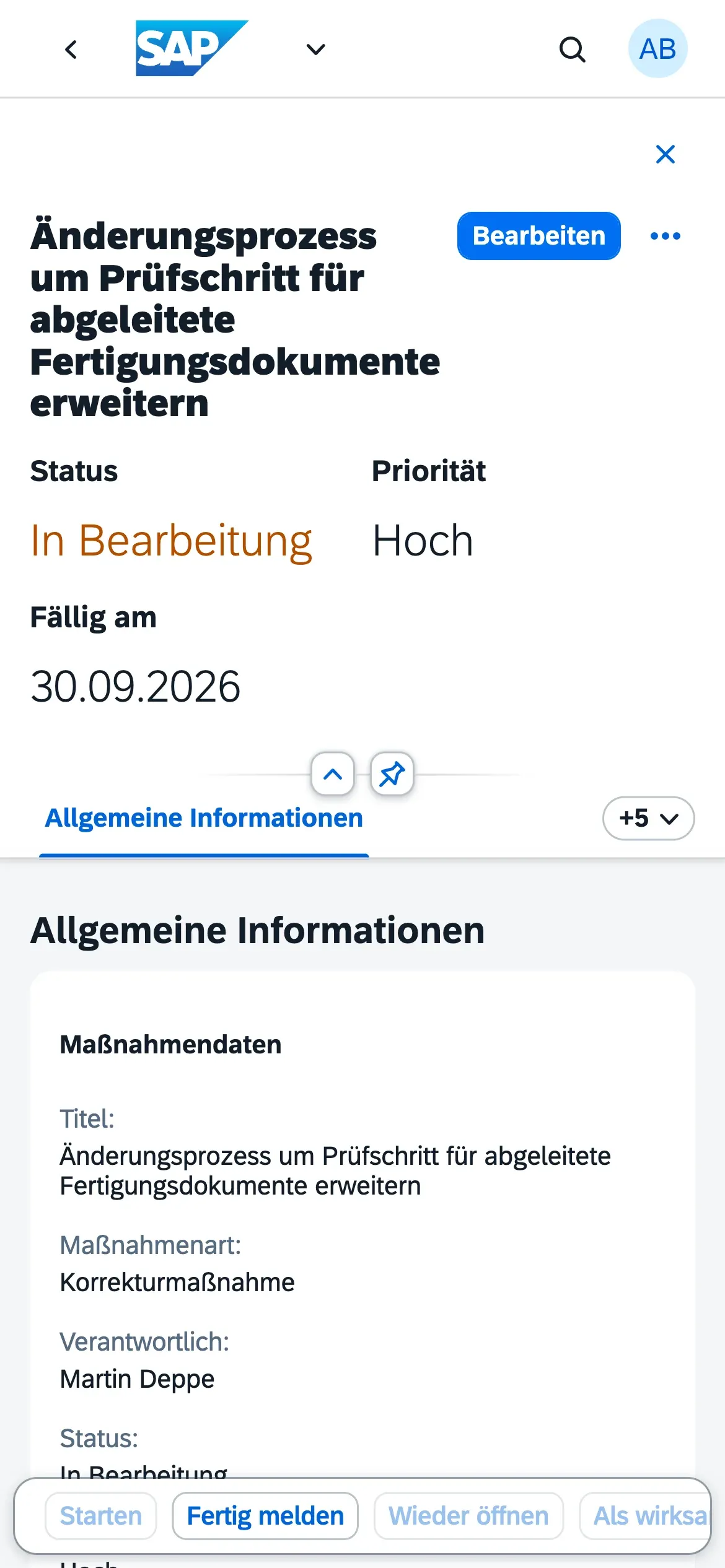
-
4 Step 4
Evidence the effectiveness
An action only closes once its effectiveness is confirmed and documented. That is the evidence ISO 9001 clause 10.2 asks for.
Learn more →
The modules
One portal, several modules
Audit is the starting point, not the scope. Modules are licensable individually and share master data, users and actions.
Audit management
AvailableAudit programme, question catalogs, on-site execution and findings per ISO 9001 and ISO 19011.
Learn more →Root cause analysis
Available5-Why and 8D following the VDA structure — with separate causal chains and a verification gate.
Learn more →Actions & CAPA
AvailablePortal-wide tracking with ownership, due dates and effectiveness checks.
Learn more →Reporting
AvailableAnalytics on findings, action items, and effectiveness — plus the cross-objective Quality Objective Cockpit.
Learn more →Processes
PlannedA process landscape with metrics per process, and the management review as its own flow — planned as the next module step.
Quality objectives per ISO 9001 clause 6.2 are part of every installation — independent of modules, with no extra licence.
In Action
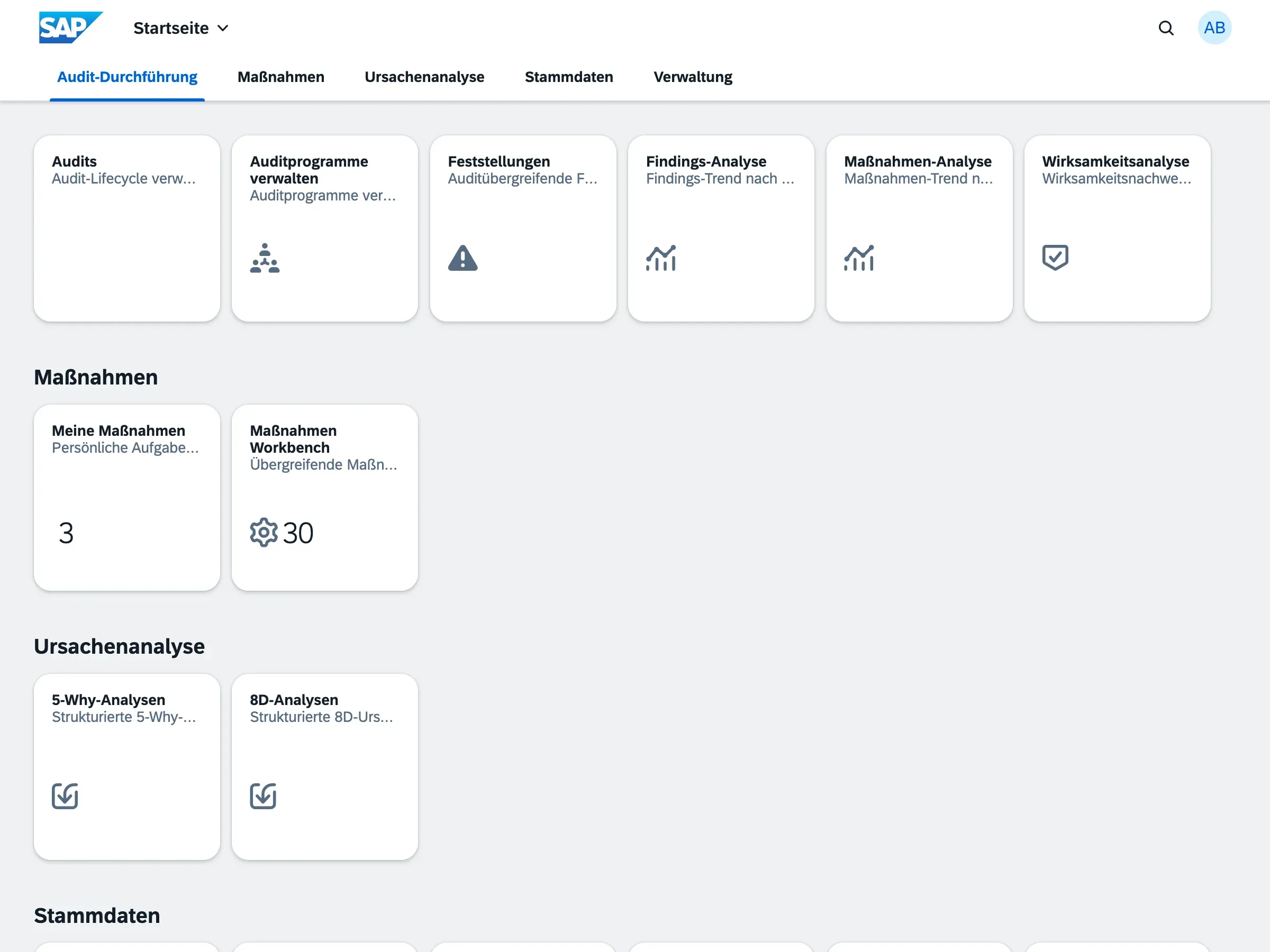
The audit module in action
Audit planning, findings and evidence in the running product.
Planning & execution
The audit as one record
Scope, objective, standard reference, team and dates on the same object — instead of spread across invitation, plan and report.
Findings
Classified and referenced
Every deviation with category, severity, audit criterion and a documented root cause.
Root cause analysis
8D progress at a glance
D1 through D8 with status — you can see which discipline an analysis currently sits on.
One platform
Every module in one place
Audit execution, actions, root cause analysis and master data in one portal with shared users.
The Workflow
From Planning to Effectiveness Review
A digital process with clear handoffs, checks, and feedback loops.
Audit Program
Define intervals, teams, and scope for your audit plans.
Audit Execution
Conduct audits with structured digital question catalogs.
Finding & Analysis
Capture nonconformities and analyze root causes immediately.
Action & Closure
Track corrective actions through to successful effectiveness verification.
Operations & technology
SAP-native on your BTP — or hosted without your own SAP environment
The same application, two operating models. The choice depends on whether you have a BTP and want to use it.
On your SAP BTP
Deployed into your own subaccount. Users, roles and identity provider stay yours — no second user directory.
Or hosted
Usable without your own BTP. For pilot projects I provide the environment so that getting started is not an infrastructure project.
Tenant-separated
Every tenant gets its own data container through SAP multitenancy — no shared data pool.
Who built this
Quality Management Practice meets Enterprise Software
qportal is grounded in years of audit work, being audited personally, and the day-to-day reality of how Excel and other siloed tools create friction.

Contact
Ready for the next level of compliance?
See the workflow in a live demo or talk through your pilot project.
- Straight to my inbox hello@qportal.solutions
- Or on LinkedIn LinkedIn
I am looking for two or three pilot users right now. You get a reply from me personally, usually the same day.